
On 21 October 2026 the PHP team released fixes for two critical vulnerabilities, CVE-2026-109618 and CVE-2026-109619, known together as PHP2Shell. An attacker needs no login or password. One crafted request to your site can let them run their own code on the server and take the site over. Within hours of the release, the security firm watchTowr reported exploitation attempts against both flaws, and Cloudflare said it was seeing early attacks.
If your website, online store or admin panel runs on PHP, your server needs the updated PHP version today.
What happened
The PHP team announced a critical release on 20 October and published fixed versions 8.5.12, 8.4.27, 8.3.36 and 8.2.35 on 21 October at 14:00 UTC. The PHP team rates them 9.2 out of 10 on CVSS v4.0, the critical level. One involves how PHP handles running out of memory. The other lets data from one request leak into the next request on the same server process.
They affect every way of running PHP on a web server: PHP-FPM, Apache with mod_php, php-cgi, LiteSpeed and FrankenPHP. The PHP team rates Apache with mod_php as the highest risk: its advisory describes a demonstrated exploit where one request without a login triggers the attack before any site code runs.
As of the evening of 21 October no security firm had reported a confirmed break-in. Code that claims to exploit the flaws already circulates online, and mass attacks can start at any moment.
Does this affect you?
Check these points. One “yes” is enough.
- Your site runs on WordPress, WooCommerce, Laravel, OpenCart, Bitrix, Drupal, Magento or another PHP system.
- Your company has an admin panel, customer portal or API written in PHP. The backend of a mobile app counts too.
- You have no confirmation from your hosting provider or developer that PHP on your server is already updated.
- Your server runs a hosting control panel such as aaPanel. Some panels did not ship updated PHP on release day.
- Your PHP version is 8.1 or older.
If you don’t know the answers, that is a reason to ask today.
What an attacker can do with your site
Code execution on the server gives an attacker the same access your site has. In practice that means:
- full control of the site: changing pages, adding admin accounts, redirecting your visitors;
- access to the database: customer names, emails, addresses, orders;
- malware or spam pages planted on your site;
- a Google warning in search results and in the browser, which stops traffic and sales until you clean up.
Cleaning up a compromised site can take days and sometimes a full rebuild. An update takes hours.
What to do today
1. Find your PHP version. Your hosting control panel shows it, usually under “PHP version” or “PHP settings”. In WordPress, open Tools → Site Health → Info → Server. On Ubuntu the version number may still show an old figure such as 8.3.6 after a security update, because Ubuntu patches the package and keeps the number. Your host or developer needs to check the package version.
2. Ask your hosting provider or developer to update PHP. You can send this message as is:
Hello. On 21 October 2026 PHP released fixes for the critical vulnerabilities CVE-2026-109618 and CVE-2026-109619 (PHP2Shell). Please confirm that PHP on our server is updated to a fixed version (8.5.12, 8.4.27, 8.3.36, 8.2.35, or a patched distribution package) and that PHP-FPM or Apache has been restarted. If we run PHP 8.1 or older, please tell us how you plan to apply the fix. Please also check the server logs for signs of exploitation since 21 October.
3. If you run PHP 8.1 or older, plan a move to a supported version. For 7.4, 8.0 and 8.1 the PHP team published only source code fixes. Someone has to build PHP from source with those fixes, or move the site to a newer version.
Turning off session.upload_progress.enabled in PHP settings closes part of the attack path. The PHP team states that this does not make a server safe. Treat it as a stopgap until the update.
Your version and what to do
| Your PHP version | What to do |
|---|---|
| 8.5 | Update to 8.5.12 |
| 8.4 | Update to 8.4.27 |
| 8.3 | Update to 8.3.36 |
| 8.2 | Update to 8.2.35. Support for 8.2 ends on 31 December 2026, so plan the next upgrade |
| 8.1, 8.0, 7.4 | No official update. Build PHP with the source fixes or move to a supported version |
| 7.3 and older | No fix from the PHP team. Move to a supported version |
Ubuntu has already released fixed packages. On other Linux distributions, check your vendor’s security advisory.
How we handled it for our clients
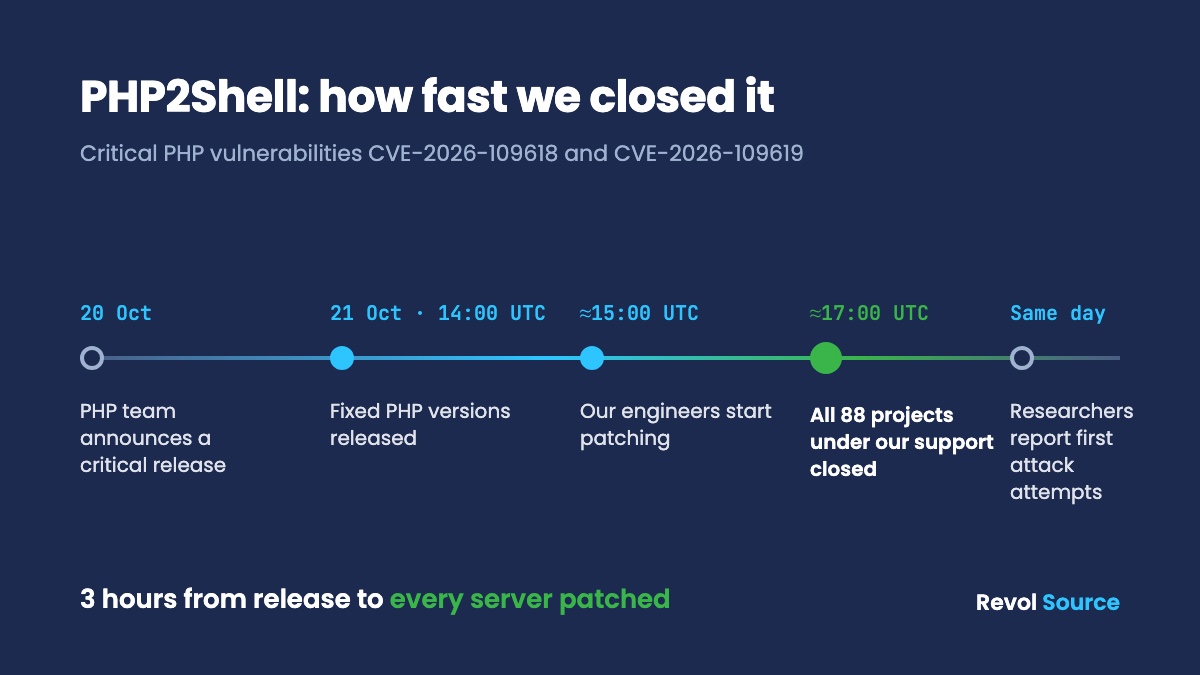
The PHP team published the fixes at 14:00 UTC. Our engineers started work about an hour later. Two hours after that, around 17:00 UTC, we had closed all servers we maintain: 88 projects under our support.
On every server we switched off the vulnerable mechanism first, then installed the fixed PHP. Hosting panels such as aaPanel had no updated PHP on release day, so we built PHP from source with the fixes. We did the same for projects on PHP 7.4, 8.0 and 8.1, which the PHP team no longer updates. After the update we went through the server logs for signs that anyone had used the vulnerability. We found none.
Our automated monitoring runs around the clock, and our engineers respond when it raises an incident.
How we did it, step by step: how we patched 88 PHP projects within three hours.
Not sure your site is protected?
We’ll check your PHP version and update it within one working day. If your site runs on PHP 8.1 or older, we’ll tell you which route is faster and cheaper for your case: a patched build or an upgrade.
If you want ongoing care after that, see website support and server support. For WordPress and WooCommerce stores we have a separate page. If you suspect someone got in before the update, or you want to know what else is open, a penetration test answers that.
FAQ
Do I need to update if my site runs on WordPress?
Yes. WordPress runs on PHP, and the vulnerability sits in PHP itself. Updating WordPress and its plugins does not fix it. Your server needs the fixed PHP version.
Will my hosting provider update PHP automatically?
Some providers do, some wait, and on many VPS and dedicated servers nobody updates PHP unless you ask. Ask your provider for written confirmation with the exact version.
Will my site break after the update?
An update within the same branch, for example from 8.3.x to 8.3.36, contains security and bug fixes only and rarely affects a site. Moving from 7.4 or 8.1 to a newer branch can break old plugins or code, so that move needs testing first.
Is switching off session.upload_progress enough?
No. It closes part of one attack path. The PHP team says only the update fixes the problem.
Sources
- PHP team announcement: https://www.php.net/archive/2026.php
- Security advisories: https://github.com/php/php-src/security/advisories/GHSA-w8hw-w9fx-j79w and https://github.com/php/php-src/security/advisories/GHSA-6wmf-4rv5-p3rp
- Ubuntu: https://ubuntu.com/blog/php2shell-vulnerability-fixes-available
- Attack attempts and exploit code reports: https://www.tenable.com/blog/php2shell-cve-2026-109618-cve-2026-109619-frequently-asked-questions-about-critical-php-remote